Understanding Unicode's Flaws and BiDi Swaps
Exploring how invisible Unicode characters and Bidirectional (BiDi) text overrides can be weaponized for phishing, supplychain attacks, and Trojan Source exploits.
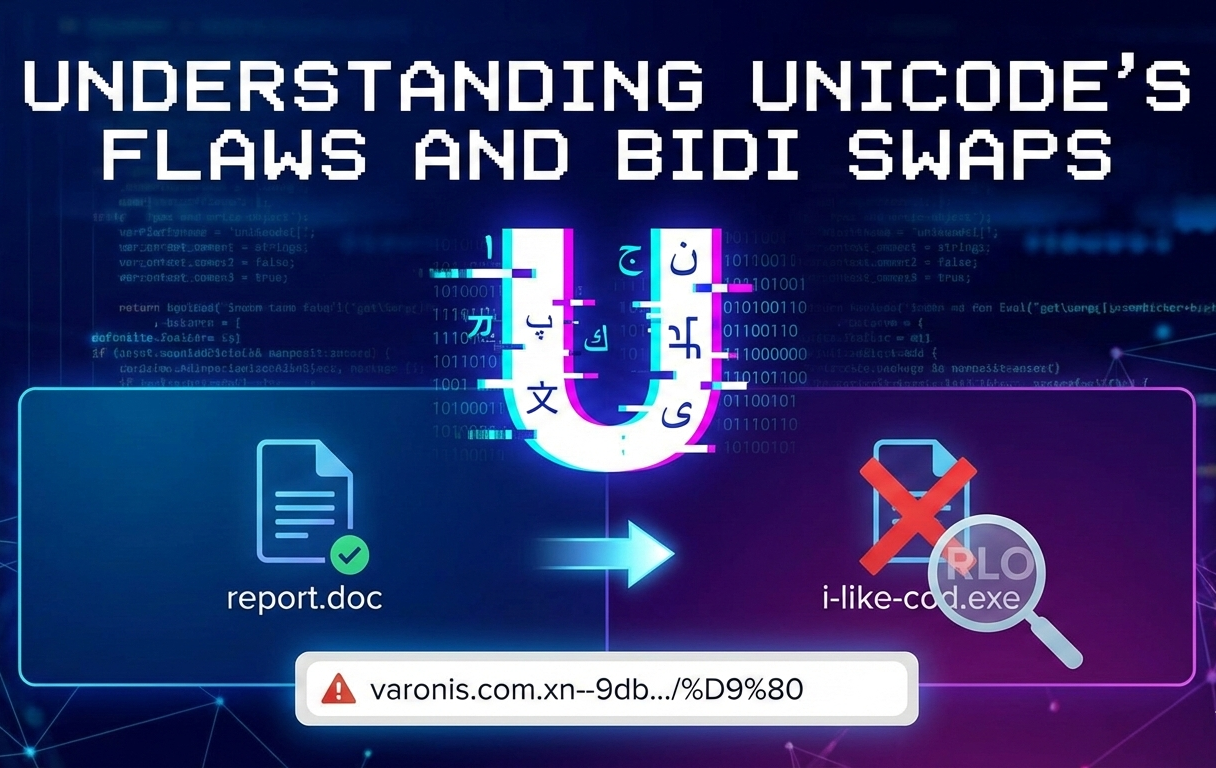
Hello World (quite literally)
Welcome to the blog! This is officially Post #0.
I’ve been meaning to start this personal security blog for a while now to document my learning journey. After wasting a lot of time overthinking the ‘perfect first topic,’ I decided to just start by writing about something I find really interesting that might actually help you
tbh I’m quite new to the blogging world, but I plan to use this page to share cool concepts I stumble upon and also, In the near future, I’ll be adding a dedicated CTF Writeups section to the categories, where I’ll break down challenges I’ve solved!
For today, I wanted to write about something basic, yet something that tickled my brain when I first saw it: Invisible Unicode and BiDi Swap. It’s a technique where the code (or URL) you see is not what the computer reads.
The Issue with Text (unicode) :
As you might already know. As humans, we trust exactly what we see, If we see a file named report.doc, we assume it’s a document. If we see a comment in C++ code, we assume the compiler ignores it.
But computers don’t read text with eyes, they read bytes, And sometimes, the rules for displaying bytes (for humans) does NOT align with the rules for executing bytes (for machines). This is where the BiDi (Bidirectional) Swap comes into play.
How it Works
Most of the western world reads text Left-to-Right (LTR).
However, languages like Arabic and Hebrew are read Right-to-Left (RTL). 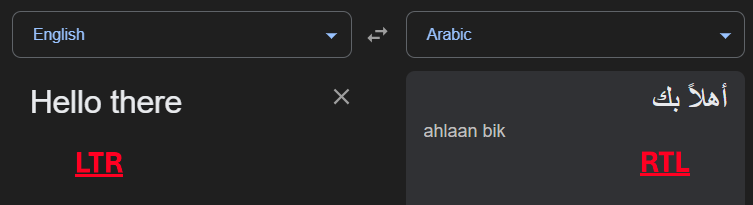 LTR vs RTL (google translate)
To support both in the same document, Unicode introduced special invisible “control characters.” One of these is the Right-to-Left Override (RLO) character (U+202E).
Since I cannot paste the invisible character here (it would break your browser’s rendering), I will use
[RLO]to represent the invisible Right-to-Left Override character, Throughout the blog.
To explain it: If you opened a new txt file in Notepad and typed in ‘Hello’ and then inserted the RTLO character and then retyped the same word right after it, it would look something like this: 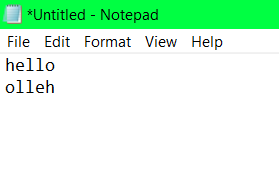 The effect of RTLO seen in notepad
The Trick: When a computer rendering engine sees the RLO character, it flips the display order of the characters that follow it, even though the logical byte order remains the same.
(try it out yourself! - if it doesn’t make sense, it’ll probably be way easier to understand if the text was right-aligned)
You can copy the Unicode character to your clipboard from here
HOWEVER, this is only how it SEEMS to the human eye, in reality, both the words are the exact same w.r.t the computer, we can confirm this by trying to save the file, in a limitied character set like ANSI instead of UTF-8 and now the words are the same, preceded by a ‘?’ as the RTLO isn’t defined in ANSI. 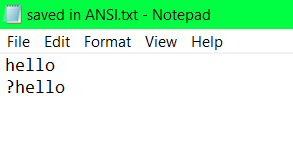 Failure to load the RTLO in ANSI
Possible attack vectors
Attack Vector 1: The File Extension Spoof
This is a classic usage that ThioJoe recently highlighted
Imagine an attacker creates a malicious executable named i-like-cod.exe. If they just send that to you, you probably won’t click it (i hope so). But, if they insert the invisible RLO character right after i-like- , look what happens to the filename:
- Logical String (Byte interpretation):
i-like-[RLO]cod.exe - Visual Render:
i-like-exe.doc
The operating system sees .exe at the very end of the string, so it executes the file. You see .doc at the end of the line, so you think it’s safe. 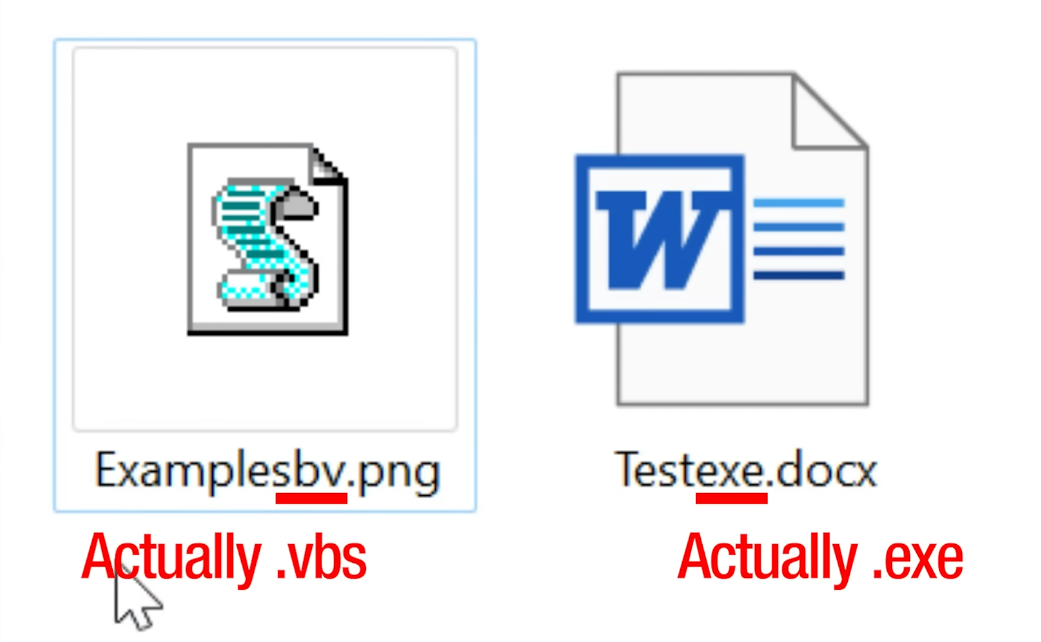 Don’t judge a file by its extension : )
Attack Vector 2: Phishing with “Lookalike” Domains
This flaw isn’t limited to files, it works on URLs too.
Browsers try to be helpful by rendering International Domain Names (aka IDNs) in their native script (like Arabic or Hebrew).
However, if an attacker mixes RTLO characters with standard URLs, they can scramble how the path looks.
You can register a domain that actually has a path at the end, but visually renders that path right in the middle of the domain name.
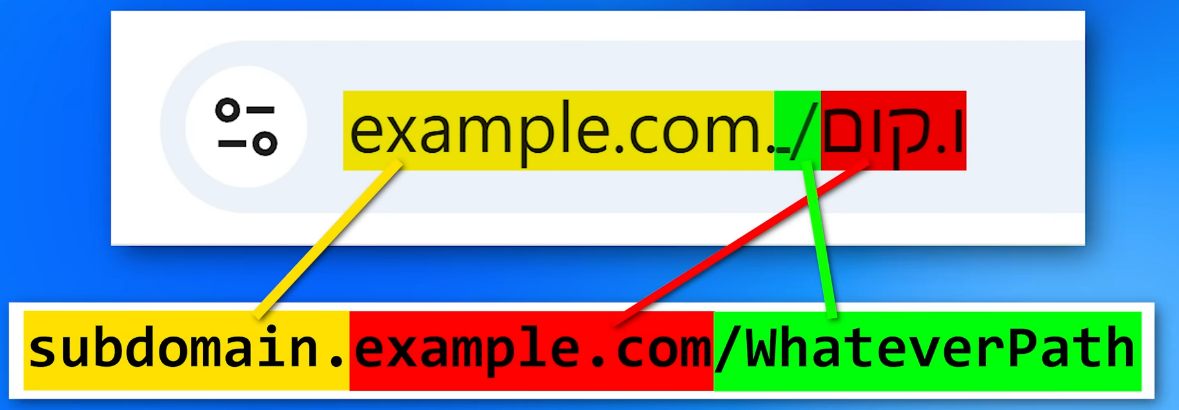 URL bar vs Actual URL
Below, I’ve given a example URL covering this Exact lookalike domain issue. Make sure to replace the “varonis.com” part with anything you like and it will still load up the same domain… click here to try this out. (hosting and explanation by Dolev Taler In his BiDi Swap Blog .)
For example, this page might look like its hosted via google.com but it really isn’t
Browsers like Chrome don’t always warn you about this by default. Firefox has a setting (network.IDN_show_punycode) to force the “ugly” raw Punycode view, which is safer. For Chrome, extensions like Unicode Domain Warning can help detect these invisible characters.
Attack Vector 3: Trojan Source (CVE-2021-42574)
This gets even scarier for developers. In 2021, it was discovered that this logic also applies to source code compilers too. This variant is known as Trojan Source.
There are several ways to implement adversarial actions with the help of this method. An adversary can: add a hidden “return” statement, leading to an early-return statement; comment out a conditional, and make it appear as valid constructs (for example, to disable important checks); assign other string values, causing string comparison to fail.
For example, an adversary may change the code by inserting the following line:
1
if access_level != "user[RLO] [LRI]// Check if admin[PDI] [LRI]" {
This line will be rendered for code reviewer as:
1
if access_level != "user" { // Check if admin
Compilers (like GCC or Clang) usually ignore the Unicode control characters. However, code editors (like VSCode ) honor them.
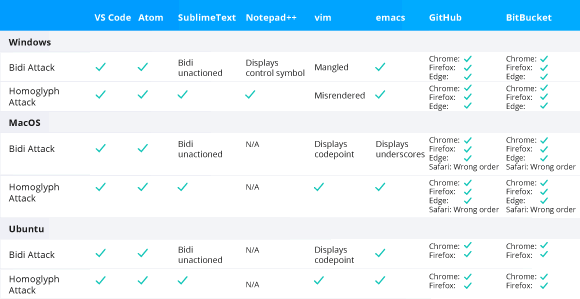 Code editors and web-based repositories vulnerable to the Trojan Source attack.
This means you can write code where the logic looks one way to the human, but completely different to the compiler.
The researchers also found another security issue (CVE-2021-42694), involving homoglyphs — characters with shapes that appear identical or very similar, but have different meanings and Unicode code points (for example, “ɑ” looks like “a”, “ɡ” — “g”, “ɩ” — “l”). In some languages, similar characters can be used in function names or variable names to mislead developers.
For a complete deep dive click here
Bonus Attack Vector : Bypassing filters for phishing attacks
Have you ever noticed, whilst reading blogs/news articles online, sometimes the new line will always begin with a fresh new word and sometimes the last word of the previous line is cut with the help of a dash (-)?
This is done via the help of soft hyphens and zero-width spaces, and if you’ve never heard of these, I wouldn’t be surprised. They’re kind of like invisible to the user but always show up behind the scenes, helping with the formatting.
The only difference between the zero-width space and the soft hyphen is that if the soft hyphen gets used to split a line, it adds a hyphen there, but otherwise it’s blank.
It basically is a way for whoever made the webpage to say, “If certain text has to be word-wrapped because there’s not enough space, then you can specify it to split at certain positions.”
Because usually it’s going to automatically split on any spaces or new lines and stuff, but this is another way to say “you can split here”
Anyway, these usually don’t show up to the actual user, but they do to an email filter or a computer reading it…
Well, scammers figured out that they can just kind of pepper these things in between words especially that might be flagged as being part of a scam.
And then they don’t trigger the spam/junk filters. 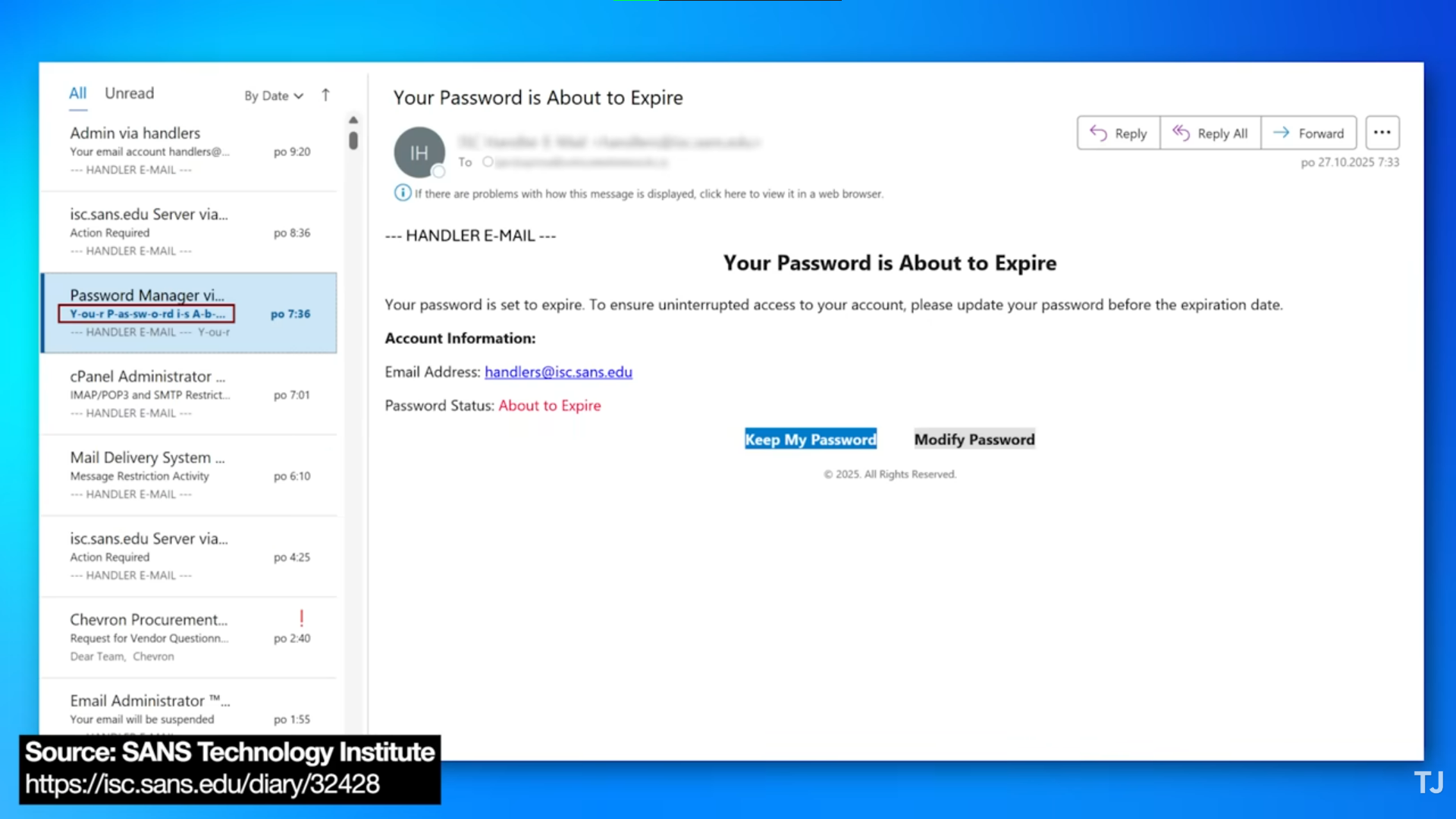 Phishing email
As you can see, in the above email, in the subject area, highlighted in red, you can see the ‘Soft Hyphens’, but are invisible when the e-mail is actually rendered into the viewing window.
Anyway, that’s just kind of a good thing to know though. If you happen to see weird dashes between words in some places that look like they shouldn’t be there, then that could be a scam email, and that’s just the technique they happen to be using.